 |  |
| Note the four downward facing IR LEDs (cliff sensors) | Does the Roomba use IR illumination to follow walls? |
Showing posts with label Xbox Live Vision. Show all posts
Showing posts with label Xbox Live Vision. Show all posts
Wednesday, 23 October 2013
Roomba 620 infrared signals
Having been pondering it for a while, I recently bought an iRobot Roomba vacuum cleaner - the Roomba 620 which is the current entry model. For fun I took some photos with an infrared sensitive webcam (a trusty XBox Live Vision), and then measured some of the IR signal codes with my Raspberry Pi.

Monday, 13 May 2013
Raspberry Pi Trail Cam - Update
Its been two months since I posted the first set of photos captured by my Raspberry Pi trail-cam. Since the UK had some unexpected snow in March 2013 - during which the garden based Raspberry Pi continued to work just fine.
Bar missing some days where the SD card filled up, and a couple of occasions when for reasons unknown motion failed, the Raspberry Pi worked very nicely - despite the cold. There were a few more unexpected sightings in the last week...
 |  |
 |  |
| Pheasants in the snow | |
Bar missing some days where the SD card filled up, and a couple of occasions when for reasons unknown motion failed, the Raspberry Pi worked very nicely - despite the cold. There were a few more unexpected sightings in the last week...
Saturday, 9 March 2013
Raspberry Pi motion sensitive Trail-Cam
My Raspberry Pi at the bottom of the garden is now monitoring an unmodified XBox webcam pointing at a fence break, rather than the mice visiting the compost heap. This uses the Motion software to hopefully catch anything walking past - like the pheasants I've seen using this route.
While most of the images so far have been of pheasants, there were a few surprises too.
 |  |
| Mr. Pheasant | Mr. Pheasant and two wives in two |
 |  |
| Pheasant on a sunny day | Quite a regular visitor |
While most of the images so far have been of pheasants, there were a few surprises too.
Thursday, 28 February 2013
Trapezium (Orion Nebula) using Xbox Webcam
 |  |
| No editing other than cropping | Annotated by hand |
As you can hopefully see, there are at least five stars here. Top right as show is the Trapezium cluster (Theta1 Orionis, or θ1 Ori for short), of which only the three brightest stars showed up. Centrally is Theta2 Orionis (or θ2 Ori), and another bright star to the left of it. That means I've captured the brightest stars in the centre of M42 nebula, but in the single stills at least there is no hint of the nebula background.
Saturday, 2 February 2013
Mouse recorded by Raspberry Pi Compost-cam
The compost-cam (my Raspberry Pi powered webcam in a compost heap) has confirmed there are regular mouse (or mice) visits, I've even spotted a visitor via the live webcam feed from motion.
 |
 |
 |
 |
| Mouse eating old melon in our compost heap. IR image taken with a modified XBox Live Vision webcam, image captured with Motion running on a Raspberry Pi. | |
Saturday, 1 December 2012
Webcam telescope image of Jupiter & Moons
It is winter again, and the upside to it getting dark before 5pm is many more chances for astronomy. This week I had my SkyWatcher telescope out again, and captured a few images of Jupiter and its moons using the XBox Live Vision webcam.
 |
| Wednesday 28 November 2012, Jupiter and four moons. 640 × 480 pixel uncropped image from Xbox 360 webcam, No filters, prime focus, SkyWatcher SK1309EQ2 telescope. Single snapshot using wxAstroCapture under Linux. |
Thursday, 1 November 2012
Mouse in the house!
I've been working on using a Raspberry Pi using passive power over ethernet to monitor webcams in the birdboxes at the bottom of the garden, using the software Motion to capture images or stream video. Given it has started to get cold at night (with frost) I've been testing the camera setup in doors, using it to keep an eye on some autumnal wildlife - at this time of year we get mice in the house:
We'd heard noises in this cupboard, and caught mice here last year, but I was a little surprised to get pictures of a visitor the first night I setup the cameras at this location. Now switching to the second camera positioned closer which benefited from the indirect illumination (and was actually in focus):
 |  |
We'd heard noises in this cupboard, and caught mice here last year, but I was a little surprised to get pictures of a visitor the first night I setup the cameras at this location. Now switching to the second camera positioned closer which benefited from the indirect illumination (and was actually in focus):
Tuesday, 2 October 2012
24V passive POE for Raspberry Pi
Today my 24V power supply arrived - the final part I needed to try a 24V passive power-over-ethernet (POE) solution down a 40m cable to drive my Raspberry Pi and two webcams. Good news - it works!
 |  |
| Raspberry Pi and two Xbox Live Vision webcams using 24V passive power over ethernet (POE) |
Monday, 6 August 2012
Power Over Ethernet for Raspberry Pi
This weekend I tested powering my Raspberry Pi and two webcams via a simple passive Power Over Ethernet (PoE) adapter. Success! It was only a 2m ethernet cable, but I hope to use about 40m in order to set this up at the bottom of the garden to monitor the webcams in my bird boxes.
 |
| Raspberry Pi serving two webcams under Motion, 5V supplied by PoE |
Thursday, 2 August 2012
Raspberry Pi with two webcams
Provided they are plugged directly into the Raspberry Pi's two USB ports directly, I've been able to connect it to two web-cameras at once, and stream the pictures using the open source Motion software (which also records images for any movement). Watching a double webcam feed from Safari on my iPad, while controlling the Raspberry Pi using Panic Inc's SSH application Prompt was kind of fun!


Thursday, 14 June 2012
Sparrows Nesting
After the disappointment of no residents in Bird Boxes 1 & 2, and the evicted blue tits in Bird Box 3, I was delighted to find Bird Box 4 in use - even if it wasn't by woodpeckers, but by sparrows. This was probably my favourite photo:

Rather than regular photos collected automatically, I was only able to check the camera periodically by taking a laptop down the garden - it was far beyond USB range.
Rather than regular photos collected automatically, I was only able to check the camera periodically by taking a laptop down the garden - it was far beyond USB range.
Monday, 23 April 2012
Widescreen upgrade for Birdbox 1
Over the weekend I upgraded my first Birdbox webcam to the improved design I used for the Woodpecker nest box camera, with a wide angle lens to capture the whole floor, and splayed IR LEDs to avoid whiteout/glare.
During the upgrade I considered replacing the camera mounting in order to rotate the camera, but decided the confined box made it too much effort. With the new lens I can now capture the whole floor and some of the side walls - the view shifted slightly while reattaching the box to the wall - but it will do.
 |  |
| Xbox webcam original lens, forward IR LEDs | Xbox webcam, 2.8mm CCTV lens, splayed IR LEDs |
Thursday, 19 April 2012
Blue Tit in residence
This evening I popped down the garden to check the webcam in Birdbox 3, to see how the blue tit nest was coming along (after the occupying tree sparrows gave up), and for the first time was able to watch a live feed of a bird in the box:


That was a nice surprise - I left them to their snooze.


Monday, 2 April 2012
Xbox Birdbox Mk IV: Woodpecker nest box
I found this Woodpecker nest box at the top of a shelf at a local independent Garden Centre gathering dust, and at £16 it seemed worth a try, given Greater Spotted Woodpeckers have been fairly regular visitors to our garden.
 |  |  |
| Woodpecker nest box | Male Greater Spotted Woodpecker eating peanuts | |
Tuesday, 27 March 2012
CCTV lenses on an Xbox Webcam
Anyone following this blog will know I've been hacking Xbox Live Vision web cameras for fun. This started with removing the lens, and attaching a telescope - which is great for photographing the moon, or the bottom of the garden. The M12 x 0.5mm thread (aka S-Mount) is also used on many CCTV cameras, so you can get alternative lenses covering a range of focal lengths. I decided to buy a £10 set on eBay and try them out.


Saturday, 24 March 2012
Xbox Birdbox Mk III
Yes, I made a third bird box with an infrared modified Xbox Live Vision webcam. This used 4 IR LEDs as in my original design, but splayed even more than in my second attempt.
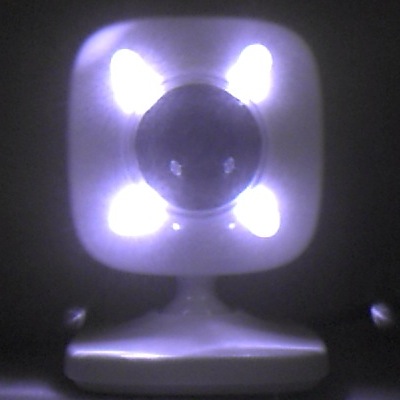 |  | 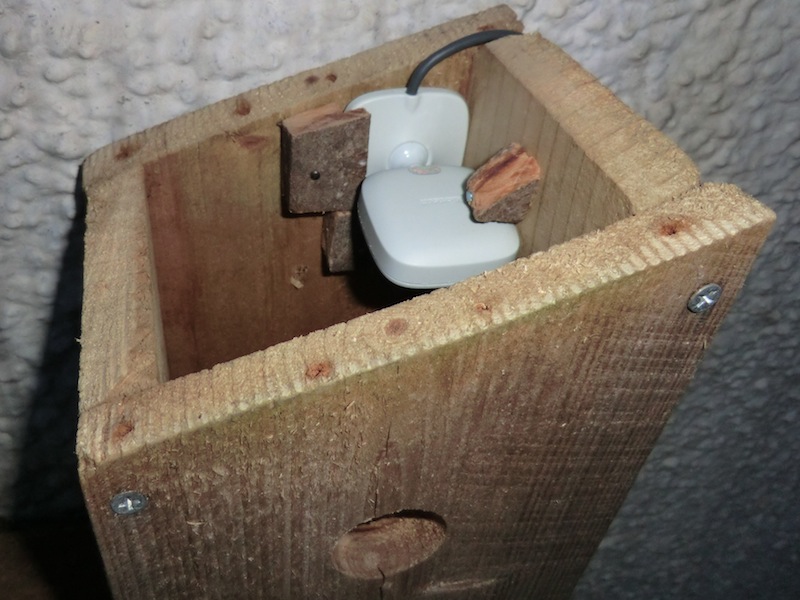 |
| 4 IR LEDs on webcam | Crude wooden clamps | Webcam installed in birdbox |
Sunday, 18 March 2012
Night Vision Xbox webcam bird box Mk II
I've already made one DIY IR LED Night Vision Xbox webcam for a bird box, and since I had some infrared LEDs left over, I decided to make another: Xbox Birdbox Mk II. This time I selected a taller bird box to ensure I capture the entire floor in the webcam's field of view, and tried six directional LEDs splayed to try to get more indirect lighting.
 |  |
| 6 IR LED Xbox webcam | Gardman Nest Box & webcam |
Tuesday, 13 March 2012
Xbox birdbox first visitor (and second)
After three nights up on the wall, my new "Xbox Birdbox" (bird nesting box with an IR night vision modified Xbox Live Vision webcam) recorded its first visitor using the 'Motion' automated webcam monitoring software. It was probably a blue great tit, but as the images are infrared dominated it is hard to be sure of the colouration - there is only a hint of yellow in some of the frames. This would have been a great image except for the focus:


Sunday, 11 March 2012
IR Night Vision Xbox webcam birdbox
I've already talked about removing the red glass filter in an Xbox Live Vision webcam to make it infrared sensitive - what I did next was add some infrared emitting LEDs to the camera so it can see in the dark. Not for astrophotography, but for close range night vision - inside a birdbox.
Monday, 5 March 2012
Japanese Yen bank notes under infra red
I have an Xbox Live Vision webcam modified for infra red (IR) sensitivity for astrophotography, by removing the red glass filter. This helps with capturing hydrogen-alpha light which is handy for red nebulosity etc. Some people do this to normal digital cameras too for infrared photography. Today I tried a DIY infra-red pass filter to block out most of the visible light... and tested it with an IR remote control and some bank notes.
Subscribe to:
Posts (Atom)